
Pictory AI Review 2026: Is It the Best AI Video Tool for Faceless YouTube Channels?

Pictory AI has been quietly becoming one of the go-to tools for faceless content creators and AI-driven video workflows — and after using it for over a year, I think I finally have enough real experience to give you a review worth reading.
My team and I have been running Pictory AI as part of our content production and AI automation system, testing it across real publishing workflows — not just poking around the dashboard for a weekend and calling it a review.
We’ve pushed it through faceless YouTube video production, script-to-video pipelines, and ongoing automation builds, so what you’re getting here is grounded in actual use.
In this review, I’ll cover Pictory AI’s key features, pricing, pros and cons, and exactly who it makes sense for.
By the end, you’ll know whether Pictory AI deserves a spot in your content workflow going into 2026 — and whether the Professional plan is actually worth what they’re charging for it.
Note: Pictory rolls out updates pretty regularly, and I’m actively testing new features as they drop. I’ll keep this Pictory AI review updated so you’re always looking at current, real-world results — not outdated information.
What is Pictory AI?

Pictory AI is an AI-powered video creation tool that turns written content into fully edited, publish-ready videos.
You give it a script or a blog post, and it pulls together relevant stock footage, auto-generates captions, and syncs everything into a video you can actually use — without touching a traditional video editor.
For faceless YouTube channels especially, this kind of tool is a big deal. You’re not on camera, you’re not recording footage, and you’re not spending three hours in Premiere Pro cutting clips together.
Pictory handles the heavy lifting so you can focus on the content strategy side of things.
What makes it stand out from other AI video tools is how complete the output feels. A lot of similar tools give you something that looks like a rough draft you still have to fix for an hour.
Pictory gets you a lot closer to a finished product right out of the gate — which matters a lot when you’re trying to build a consistent publishing schedule.
We brought Pictory into our workflow primarily for faceless YouTube video production and as part of a broader AI automation system for content creation.
The idea was to reduce the manual steps between having a script and having a uploadable video. And honestly, it’s delivered on that pretty well over the past year.
The most common use cases are faceless YouTube videos, blog-to-video repurposing, short-form social content, and automated video pipelines. It’s not a tool for live video, real-time editing, or anything that requires fine-grained manual control over every frame.
But for high-volume, consistent content production — it fits naturally into that workflow.
One thing I want to be upfront about — Pictory isn’t going to replace a full video production setup for high-end cinematic content. That’s not what it’s designed for.
What it does really well is remove the bottleneck between having ideas and actually getting videos published. And for a faceless channel running on an AI-assisted workflow, that bottleneck is usually the biggest problem to solve.
Now let’s get into the features that actually make it worth talking about.
Pictory AI Key Features
Alright, let’s get into what Pictory AI actually does. This is the section that’ll tell you whether it fits your workflow or not — so I’ll keep it practical and based on what we’ve actually used rather than just running through a marketing checklist.
1. Script to Video
This is the feature we use the most, and honestly the one that sold us on Pictory in the first place.
You paste in your script, and Pictory automatically matches each section of text with relevant stock footage from its library. It then stitches everything together into a structured, watchable video with captions already baked in.
For faceless YouTube channels, this single feature removes what used to be the most time-consuming part of the whole production process.
What used to take a couple of hours of manual clip hunting and timeline editing now takes a fraction of that time. It’s not always a perfect match on the first pass — sometimes the footage it pulls feels a little generic — but it gets you 70 to 80 percent of the way there, and that’s genuinely valuable when you’re publishing consistently.
2. Blog Post to Video
You drop in a URL, Pictory pulls the content from the page, and it converts the article into a video automatically. It identifies the key points, pairs them with visuals, and generates a structured video ready for editing.
We’ve used this for repurposing written content into YouTube videos and short-form clips.
The output quality depends a lot on how well-structured the original article is — clean, well-organized posts convert noticeably better than dense walls of text. But as a content repurposing tool inside an automation workflow, it’s a serious time saver.
3. Video Editing with AI
Pictory has a built-in AI editing layer that goes beyond just slapping footage together. It can automatically remove filler words, silence gaps, and even specific keywords from your video — which is surprisingly useful when you’re working with recorded audio or voiceovers that need cleaning up without going into a full audio editor.
This is one of those features that sounds minor until you actually use it. Cleaning up a 10-minute script read manually is tedious. Letting Pictory handle the obvious dead weight automatically saves real time across a publishing schedule.
4. Auto Captions and Subtitles
Every video Pictory generates comes with automatically synced captions. You can customize the font, size, color, positioning, and style to match your brand. For YouTube and short-form content, captions are non-negotiable at this point — a significant portion of viewers watch without sound, especially on mobile.
The accuracy is solid for standard English. For technical terminology or less common words, you’ll want to do a quick pass and correct anything that got misread. It’s a minor step but worth doing before publishing.
5. Stock Media Library
Pictory gives you access to a large library of stock footage and images — we’re talking millions of clips from sources like Storyblocks. For faceless content, this is basically your entire visual layer, so the quality and variety of the library matters a lot.
In our experience the library is broad enough to cover most general topics comfortably. Where it gets thinner is highly specific or niche technical subjects — if your content is very specialized, you’ll occasionally hit a wall and need to supplement with your own footage or external sources. Something to be aware of going in.
6. Brand Customization
You can set up brand kits inside Pictory — your logo, color palette, fonts, and intro/outro templates. Once it’s configured, every video you generate carries consistent branding without having to manually apply it each time.
For anyone running a faceless channel with a defined visual identity, this is the kind of feature that pays off quietly over time. Consistency across your video library looks more professional and helps with channel recognition, even when your face is never on screen.
7. AI Voiceover Integration
Pictory has built-in AI voiceover options you can apply directly to your videos without leaving the platform.
The voice selection is decent for basic use. That said, we actually pair Pictory with ElevenLabs for our voiceovers — we generate the audio separately and drop it into Pictory during the editing stage.
The quality difference is noticeable, and if voice naturalness matters to your channel, it’s worth the extra step.
The fact that Pictory accepts external audio files makes this an easy integration to build into an automation workflow.
8. Video Highlights and Summarization
This one is particularly useful for repurposing longer content. You can feed Pictory a long-form video and it’ll automatically identify and extract the most compelling clips — essentially creating short-form content from something you’ve already produced.
For anyone trying to build a cross-platform presence from a single piece of content, this removes a lot of manual scrubbing through footage to find the right moments. It’s not always perfect, but it’s a genuinely useful starting point.
9. Team Collaboration
On the Professional and Teams plans, multiple users can work inside the same Pictory workspace.
For small teams or anyone managing video production across more than one person, this keeps everything centralized and avoids the back-and-forth of passing files around.
We don’t use this feature heavily since our workflow is fairly streamlined, but for growing teams it’s a solid inclusion.
10. API and Automation Support
For anyone building AI content systems — which is a big part of what we do — Pictory’s API access is worth knowing about.
You can plug it into your automation stack and trigger video generation programmatically, which opens up the possibility of a fairly hands-off content pipeline from script to finished video.
This is still an area where Pictory is maturing compared to something like ElevenLabs’ API, but the foundation is there and it’s usable for building real workflows.
Pictory AI Pros and Cons
Let’s now consider the pros and cons of Pictory AI. No fluff, just what we’ve actually experienced using it on the Professional plan.
The Pros
Turns scripts into publish-ready videos fast. This is the core value proposition and it delivers. For a faceless YouTube channel running on an AI workflow, the time savings between having a script and having an uploadable video is significant. We’re talking hours of manual editing work compressed into minutes.
No video editing experience required. Pictory is genuinely beginner-friendly. The interface is clean, the workflow is logical, and you don’t need to know anything about timelines, keyframes, or color grading to produce something that looks professional. That’s a real advantage for creators who want to focus on content strategy rather than production skills.
Blog to video repurposing is a legitimate time saver. If you’re sitting on a library of written content, Pictory gives you a straightforward way to turn that into video without starting from scratch. For SEO-focused creators trying to build a presence on YouTube alongside their blog, this is a pretty compelling workflow.
Auto captions out of the box. Every video comes with synced captions automatically. Given how important captions are for watch time and accessibility, having this handled without an extra tool or manual step is genuinely useful.
Brand kit keeps everything consistent. Set it up once and every video you generate carries your branding automatically. For a faceless channel where visual consistency is part of your identity, this quietly does a lot of work in the background.
Pairs well with other AI tools. Pictory plays nicely with external voiceovers, custom footage, and automation pipelines. We run it alongside ElevenLabs for voice and it integrates cleanly. If you’re building a multi-tool AI content system, Pictory fits into that stack without friction.
The Cons
The AI footage matching isn’t always accurate on the first pass. Pictory makes educated guesses about which clips fit each section of your script, and sometimes those guesses are off. You’ll need to do a review and swap out clips manually before publishing. It’s not a dealbreaker but it is a regular part of the process rather than an occasional fix.
Video length limitations depending on your plan. The Starter plan caps video length at 10 minutes, which is limiting for longer YouTube content. You need the Professional plan to unlock longer videos, which pushes the monthly cost up. Worth knowing before you commit to a lower tier.
Voiceover quality on the built-in options is average. The native AI voices inside Pictory are functional but not exceptional. If voice quality matters for your channel — and for YouTube it really does — you’ll want to bring in audio from a dedicated tool like ElevenLabs and import it. It’s an extra step that’s easy enough to build into a workflow, but it does mean Pictory alone isn’t a complete solution for voice-forward content.
Pictory AI Pricing
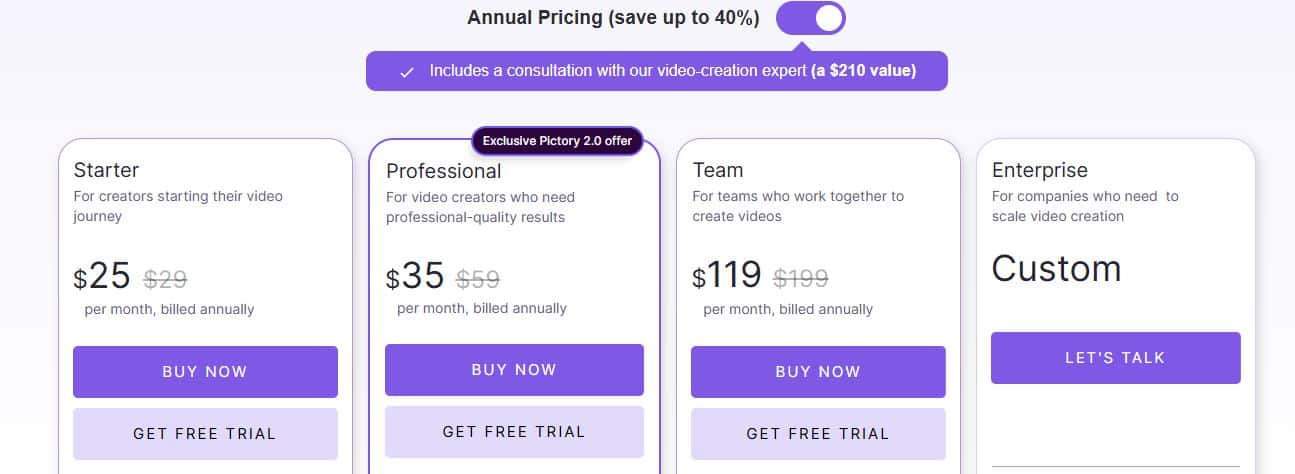
There are four pricing plans on offer:
Free Trial — $0
Pictory offers a free trial that gives you access to the platform to test the core features. You get a limited number of video projects to work with — enough to get a real feel for the script-to-video workflow before committing to anything. No credit card is required to start, which makes it a low-friction way to evaluate whether it fits your use case.
Starter Plan — $25/month
You get 30 videos per month, access to the stock media library, auto captions, and brand kit features. Videos are capped at 10 minutes in length. For someone just getting started with AI video creation or testing Pictory as part of a new workflow, this is a reasonable entry point. The 10-minute cap does become a limitation fast if you’re producing standard YouTube content though.
Professional Plan — $35/month
This is the plan we run on, and for most serious creators it’s where you’ll land. You get 60 videos per month, video length up to 60 minutes, access to all core features including the AI editing tools, and higher priority rendering. The jump from Starter to Professional is worth it if you’re publishing consistently and need the longer video support.
Teams Plan — $199/month
Built for multi-person content teams. You get everything in Professional plus additional user seats and team collaboration features. If you’re running a content operation with more than one person involved in video production, this tier keeps everything centralized without passing files back and forth.
Try Pictory AI for free Today.
Pictory AI — Frequently Asked Questions
These are the questions that come up most consistently when I talk about Pictory AI with other creators and automation builders. Figured I’d address them all in one place.
Is Pictory AI free to use?
There is a free trial that gives you access to the core features without needing a credit card.
You get a handful of video projects to work with, which is honestly enough to run a couple of real scripts through and see how the output looks for your specific content type.
It’s not a forever-free plan though — once the trial runs out you’ll need to move to a paid tier to keep producing. But the trial is genuinely useful for evaluation, not just a 10-minute demo.
Is Pictory AI good for beginners?
Yes, and this is one of its genuine strengths. You don’t need any video editing background to get a usable result out of Pictory.
The interface walks you through the process in a logical sequence and the automation handles the parts that would normally require technical knowledge.
If you’re a creator who wants to publish consistently without climbing a steep learning curve, Pictory is about as accessible as it gets in the AI video space right now.
Can Pictory AI make faceless YouTube videos?
This is literally what we use it for, so yes — it’s well suited for it.
You bring the script, Pictory pulls the footage and builds the structure, you drop in your voiceover, review the clip matches, and you’ve got a faceless video ready to publish. It’s not a fully hands-off process but it removes the heaviest manual steps from the workflow.
For anyone building a faceless channel on an AI-assisted production system, it fits naturally.
How many videos can I make with Pictory AI per month?
It depends on your plan. The Starter plan gives you 30 videos per month with a 10-minute length cap per video. The Professional plan bumps that to 60 videos per month with up to 60 minutes per video.
The Teams plan extends further for multi-user setups. For a consistent YouTube publishing schedule on the Professional plan, 60 videos per month is more than enough headroom for most creators.
Does Pictory AI have good stock footage?
For general topics it’s solid — the library pulls from sources like Storyblocks and gives you millions of clips to work with. Where it gets thinner is highly specific or technical subject matter.
If your content covers niche AI tools, detailed workflow builds, or very specialized topics, you’ll occasionally need to supplement with your own screen recordings or external footage. It’s something to factor in depending on your niche.
Is Pictory AI worth it for content automation?
For building a scalable, AI-assisted content pipeline — yes, it’s worth serious consideration.
The script-to-video workflow, API access, and compatibility with external tools like ElevenLabs make it a practical piece of a broader automation stack.
It’s not a magic button that produces perfect videos without any input, but it removes enough manual steps from the process that the time savings are real and measurable over a consistent publishing schedule.
How does Pictory AI compare to other AI video tools?
Pictory sits in a strong position for text-based video creation — turning scripts and blog posts into structured videos is genuinely what it does best.
Tools like InVideo and Synthesia exist in a similar space but serve slightly different use cases. Synthesia, for example, leans heavily into AI avatars which Pictory doesn’t focus on.
InVideo is a closer comparison but Pictory’s automation depth and blog-to-video feature give it an edge for content repurposing workflows. That said, no single tool does everything — most serious creators end up running a small stack of complementary tools rather than relying on one platform for everything.
Is the Professional plan worth it?
For consistent creators and automation builders, yes.
The jump from Starter to Professional unlocks longer video support, double the monthly video volume, and access to the full feature set that makes Pictory genuinely useful for a real publishing workflow.
We’ve been on the Professional plan for over a year and it covers our production needs without us hitting limits regularly.
If you’re serious about using Pictory as part of your content system rather than just experimenting with it, the Professional plan is the right tier to be on.
Conclusion
Alright, let’s bring it home.
After using Pictory AI for over a year across faceless YouTube video production and AI automation workflows, the honest verdict is this — it’s a genuinely useful tool for the right use case, and the right use case is high-volume, script-driven content creation where speed and consistency matter more than frame-by-frame creative control.
The script-to-video workflow is the real star of the show. It doesn’t produce a perfect video on the first pass every single time, but it gets you close enough that the editing time is a fraction of what traditional production would take.
For a faceless channel trying to publish consistently without a large production team, that efficiency is hard to put a number on.
The stock footage library covers most general content well, the auto captions work reliably, and the brand kit keeps your visual identity consistent without any extra effort.
Where it shows its limitations is on very niche or technical content where the available footage just doesn’t quite fit, and on voice quality if you’re relying solely on the built-in options.
Both of those gaps are workable — we supplement with ElevenLabs for voice and our own screen recordings where needed — but they’re worth knowing about before you go in with unrealistic expectations.
Is it perfect? No. Is it a meaningful upgrade to an AI-driven content workflow? Absolutely. Pictory has earned its place in our production stack and that’s not changing anytime soon.
If you’re on the fence, start with the free trial and run two or three of your actual scripts through it.
Don’t test it with placeholder content — use real scripts from your channel so you get an accurate picture of what the output looks like for your specific niche. That’ll tell you more than any review will.

Is Bluehost the Right Choice for Beginner Bloggers?

7 Best AI Tools to Create and Sell Digital Products Online in 2026

7 Best WordPress Themes for Blogs in 2026 (Expert picks)
About Author

Alma Coul
Alma is the founder and CEO of Eagles Digital. He is an SEO expert and has over seven years of experience in Web programming and building visibility for businesses through content marketing.