
ElevenLabs Review 2026: Real Results After Using It to Build an AI Content System
Looking for an ElevenLabs review? You’re in the right place.
I’ve been testing this tool for content creation work for a while now, especially for YouTube videos and short-form content, and I wanted to break it down based on real use, not just what’s written on the homepage.
In this review section, I’ll keep it simple and focus only on two things: a quick intro so you understand the context, and then a clear explanation of what ElevenLabs actually is in practice.
No fluff, just what I’ve personally noticed while using it for voiceover work.
By the end, you’ll already have a solid idea of whether this AI voice tool fits your content workflow or not, especially if you’re building faceless YouTube channels, reels, or explainer videos.
What is ElevenLabs?
ElevenLabs is an AI-powered text-to-speech tool that converts written text into realistic, human-like audio.
You paste your script, pick a voice, and it spits out audio that genuinely sounds like a person recorded it in a studio.
No weird robotic pauses. No mispronounced words every other sentence. Just clean, natural-sounding speech.
And look, I’ve tried a lot of TTS tools over the years. Most of them have that signature “AI voice” thing going on where it sounds fine for about 10 seconds and then you notice something is just… off.
ElevenLabs doesn’t really do that, which is a big part of why it caught our attention in the first place.
The most common use cases are YouTube voiceovers, Instagram Reels, explainer videos, and audiobooks — basically anything where you need clear, professional narration without hiring a voice actor for every single piece of content.
Our team uses ElevenLabs to generate voiceovers for YouTube videos and short-form Reels.
A lot of our content covers AI tools, automation workflows, and step-by-step system builds — so accurate pronunciation of tool names, platform features, and technical terminology is non-negotiable for us.
Getting those details pronounced clearly and confidently builds trust with your audience. ElevenLabs handles that better than anything else we’ve tested.
The voice quality is honestly what sets it apart. It’s expressive, consistent, and doesn’t fade in naturalness the way some tools do over longer audio clips.
For podcasts, long-form narration, or any audio that runs more than a few minutes, that consistency matters a lot more than people realize.
One thing worth mentioning upfront — ElevenLabs is great for pre-recorded content, but it’s not designed for live conversations or real-time voice interactions. If that’s what you need, you’re looking at a different category of tool entirely.
Now that you have a solid high-level understanding of the platform, let me walk you through the key features that actually matter.
ElevenLabs Key Features
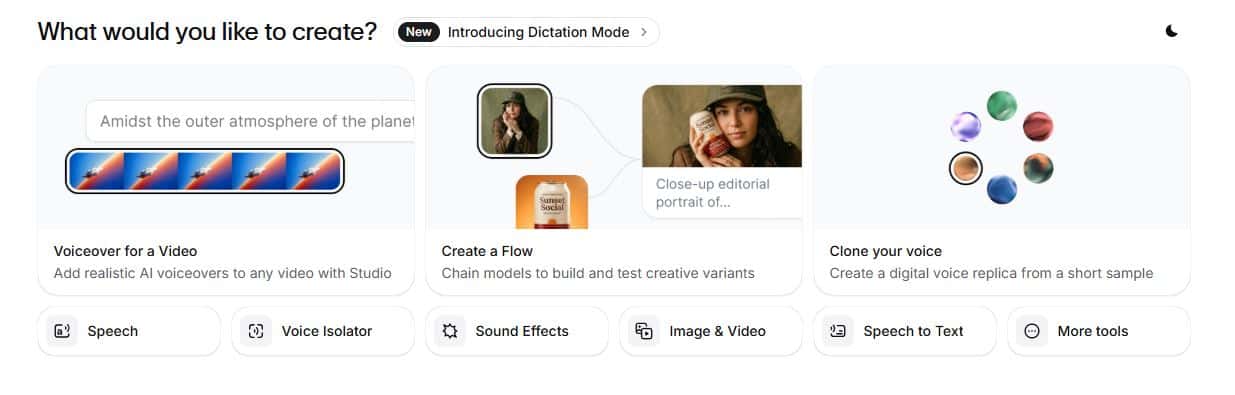
Alright, let’s get into the good stuff. Features are where ElevenLabs really earns its reputation — and honestly, where it separates itself from the dozen other AI voice tools floating around right now.
Here’s what actually matters for creators building content and automation systems.
1. Text-to-Speech
This is the core of what ElevenLabs does, and it does it really well.
You drop your script in, select a voice, and within seconds you’ve got a clean audio file ready to go. There are a ton of built-in voices to choose from — different accents, tones, pacing styles — so you’re not stuck with one generic narrator sound across all your content.
What I appreciate most is how well it handles both short-form and long-form content. Whether you’re pumping out 60-second Reels or a 15-minute YouTube deep dive, the output quality stays consistent throughout. That’s not something every TTS tool can claim.
2. Voice Cloning
This is the feature that gets people talking — and for good reason. Voice cloning lets you create a digital version of your own voice, which is a game changer if you’re running a faceless channel or trying to scale content without recording yourself every single time.
There are two ways to do it. Instant Voice Cloning (IVC) is the quick option — you feed it about a minute of audio and it generates a clone pretty fast. It works, but the result isn’t always a dead-on match.
Good enough for testing, not always good enough for your main channel voice.
Professional Voice Cloning (PVC) is where things get serious. You train the model on a larger set of your own voice samples, and the output is noticeably more accurate — the tone, the pacing, even subtle quirks in how you naturally speak. We’ve been using PVC for our own content and the results have genuinely impressed us. It’s not perfect, but it’s close enough that most viewers won’t notice a difference.
For anyone building an automation system around content production — think scheduled uploads, bulk video creation, or AI-assisted publishing workflows — this feature alone can save you hours every single week.
3. Multilingual Voice Support
ElevenLabs supports over 70 languages now, up from 32 not too long ago. And the impressive part isn’t just the number — it’s that the accent and tone stay consistent with the original voice across languages.
So if you clone your voice in English and then generate audio in Spanish or Portuguese, it still sounds like you, just speaking another language.
For anyone trying to reach a global audience or repurpose content across different markets, this is a genuinely useful feature that removes a huge production bottleneck.
4. Sound Effects Library
This one’s a nice bonus. ElevenLabs has a built-in sound effects section where you can search and download audio clips to layer into your content.
Nothing groundbreaking, but having it in the same platform means one less tab open during your production workflow. Small thing, but it adds up.
5. Voice Isolator
If you’ve ever recorded audio somewhere less than ideal — a home office with HVAC noise, a room with echo, outside with wind — you know how painful cleanup can be.
The Voice Isolator strips out background noise and pulls the clean voice track forward.
We haven’t had to lean on this one heavily, but the few times we’ve tested it, it did a solid job. It’s the kind of feature you don’t think about until you really need it, and then you’re grateful it’s there.
6. Voice Stability Control
This is a slider-style setting that controls how consistent vs. expressive your generated voice sounds. Crank up the stability and you get a steady, even delivery — great for instructional or technical content. Dial it back and the voice picks up more natural variation and emotion.
Honestly, finding the right balance took a little experimentation on our end. Too much stability and it starts sounding flat. Too little and it gets unpredictable. We’ve landed on a middle setting for most of our content and it hits that sweet spot of natural without being all over the place.
7. API Access
For anyone building automated content systems — which, if you’re here, is probably you — the API is worth knowing about.
ElevenLabs gives developers programmatic access to voice generation, which means you can plug it directly into your automation stack. Content pipelines, scheduled video production, dynamic audio generation for apps or tools — it all becomes possible.
One thing to flag: heavy API usage can get expensive depending on your plan and volume. Worth mapping that out before you build it into a large-scale workflow.
On the performance side though, the Flash v2.5 model delivers around 75ms latency, which makes it viable for real-time use cases like AI assistants or interactive applications.
8. Emotional Audio Tags
This feature doesn’t get talked about enough, and it should. Emotional audio tags let you tell the AI not just what to say, but how to say it.
You drop a simple tag into your script — something like [excited], [calm], [serious] — and the voice delivery shifts accordingly.
For video content, this is huge. The difference between a flat read and an emotionally on-point delivery is what separates forgettable content from stuff people actually finish watching.
Instead of re-generating the same clip five times trying to get the right tone, you just adjust the tag and move on.
We use this regularly in our production workflow now and it genuinely speeds things up while making the final audio feel more engaging and less robotic.
ElevenLabs Pros and Cons
No tool is perfect, and I’d rather give you an honest breakdown than just hype it up. After using ElevenLabs consistently across our content and automation workflows, here’s where it genuinely delivers and where it falls a little short.
The Pros
Voice quality that actually holds up. This is the big one. The output sounds natural, expressive, and consistent — even on longer scripts. For a faceless YouTube channel, that’s not a nice-to-have, it’s the whole game. If your voiceover sounds like a robot, people bounce.
A serious range of voices and languages. With 70+ languages and a wide library of built-in voices covering different accents, tones, and styles, you’ve got real flexibility. Whether you’re producing content for a US audience or trying to expand into other markets, the options are there.
Voice cloning that works. A lot of tools claim voice cloning. ElevenLabs is one of the few that delivers it at a level worth using in real production. The Professional Voice Cloning in particular is genuinely impressive once you’ve trained it properly.
Beginner-friendly interface. You don’t need to be technical to use this. The dashboard is clean, the workflow is straightforward, and you can go from pasting a script to downloading audio in under two minutes. For creators building out AI automation systems, the low learning curve means you can integrate it fast and move on.
Way cheaper than hiring voice talent. A professional voice actor can run anywhere from $200 to $500+ per finished hour of audio depending on usage rights. ElevenLabs paid plans start at a fraction of that for a monthly volume of content. The math is pretty easy.
API access for automation. If you’re building workflows — and honestly, if you’re reading this, you probably are — the API opens up a lot of doors. You can connect it to your content pipeline and generate audio programmatically without ever opening the dashboard.
The Cons
Higher-tier plans get expensive fast. The free and starter plans are fine for testing or low-volume use, but once you’re producing content at scale, you’ll likely need a higher plan. The jump in pricing between tiers is noticeable and can add up if you’re not tracking your usage carefully.
Credit limits can sneak up on you. ElevenLabs runs on a credit system based on characters generated. If you’re producing a lot of long-form content in a given month, you can burn through credits faster than expected. We’ve hit that wall a couple of times and had to adjust our workflow. Just something to plan around.
ElevenLabs Pricing
Let’s talk money, because this is usually where people’s decisions actually get made.
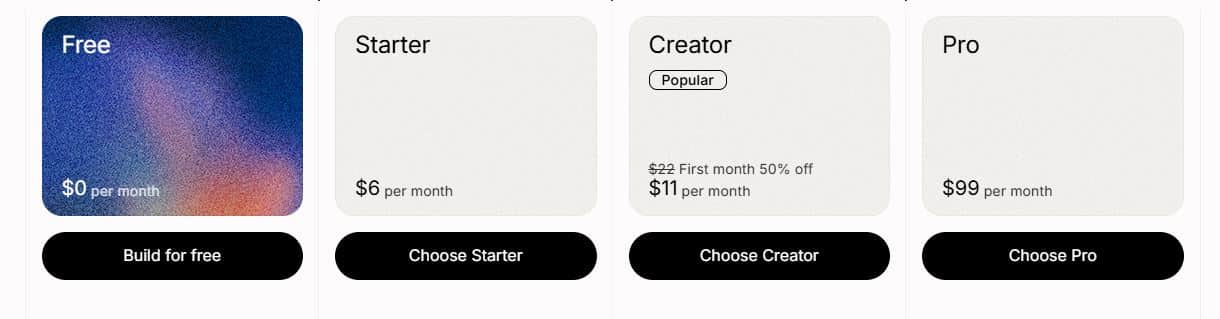
ElevenLabs uses a tiered subscription model, and the right plan really depends on how much content you’re producing each month. Here’s a breakdown of the current plans:
Free Plan — $0/month
You get 10,000 characters per month, access to standard voices, and the ability to create up to 3 custom voices. Honestly, it’s decent for testing the platform and getting a feel for the voice quality. Not enough for regular content production though.
Starter Plan — $5/month
Bumps you up to 30,000 characters per month and unlocks commercial usage rights, which matters if you’re monetizing your YouTube channel. You also get access to Instant Voice Cloning at this tier. For someone just starting out with AI voiceovers, this is a solid entry point.
Creator Plan — $22/month
This is where most content creators land. You get 100,000 characters per month, Professional Voice Cloning access, and higher quality audio output. If you’re publishing consistently on YouTube or building out short-form content, this tier covers the majority of use cases without breaking the budget.
Pro Plan — $99/month
500,000 characters per month, more custom voices, and higher API limits. This tier is built for teams or creators running high-volume production pipelines. If you’re building an AI automation system that generates content at scale, this is the tier worth looking at seriously.
One thing worth knowing — ElevenLabs does occasionally run pricing adjustments and feature updates, so it’s always worth checking their official pricing page directly before committing to a plan.
We’ve seen the character limits shift a couple of times over the past year as they’ve updated their model offerings.
Try ElevenLabs for Free Today.
ElevenLabs — Frequently Asked Questions
These are the questions that come up most often when I talk about ElevenLabs in creator communities and AI tool discussions. Figured I’d address them here so you’ve got everything in one place.
Is ElevenLabs free to use?
Yes, there is a free plan. You get 10,000 characters per month to work with, which is enough to test the platform and get a real feel for the voice quality.
The catch is that the free plan doesn’t include a commercial license — so if you’re monetizing your YouTube channel or using the audio in any kind of paid or sponsored content, you’ll need to upgrade to at least the Starter plan. Don’t skip that detail, it matters.
Can ElevenLabs actually clone my voice?
It can, and it does it pretty well. You have two options — Instant Voice Cloning for a quick result using about a minute of audio, or Professional Voice Cloning if you want something closer to your actual voice.
The more quality audio samples you feed the model during PVC training, the better the output. We’ve gone through this process ourselves and the results are genuinely usable for real content production.
Is the ElevenLabs API free?
The API is accessible on the free plan, but your usage is capped by your monthly character limit. Once you burn through those, you’re done until the next billing cycle unless you upgrade.
If you’re planning to build any kind of automation workflow around the API — which is honestly one of the best use cases for it — you’ll want to be on a paid plan from the start so you’re not hitting walls mid-pipeline.
Is ElevenLabs the best text-to-speech tool available?
It’s genuinely one of the best, yes. In terms of voice naturalness, consistency, and the overall feature set for content creators, it’s hard to find something that competes at the same level right now.
That said, “best” depends on your specific use case.
For YouTube voiceovers, faceless channels, and AI-assisted content workflows, it’s at the top of the list. For real-time voice applications, you’d be looking at different tools built for that purpose.
Is the Creator plan actually worth it?
For consistent content creators, absolutely. If you’re publishing regularly on YouTube, building out Reels, or running any kind of content automation system, 100,000 characters per month covers a solid volume of scripts.
You also get Professional Voice Cloning at that tier, which alone justifies the price for most creators. We run the Creator plan for our channel and it handles our production volume without issue.
Is ElevenLabs generative AI?
Yes. It uses a highly advanced generative AI model to synthesize speech from text — it’s not just stitching together pre-recorded audio clips like older TTS systems did.
The model actually generates the audio from scratch based on your input, which is why the output sounds as natural and expressive as it does.
Conclusion
Alright, let’s wrap this up.
After using ElevenLabs consistently across our content and AI automation workflows, the verdict is pretty straightforward — it delivers.
The voice quality is genuinely good, the feature set covers what most creators actually need, and the ability to clone your voice and plug it into an automated content pipeline is something that just wasn’t accessible at this price point a couple of years ago.
Is it perfect? No. The credit limits require some planning, the higher-tier pricing adds up if you’re not intentional about your usage, and the occasional pronunciation correction is a minor but real friction point.
But those are manageable trade-offs for what you get in return.
For creators building faceless YouTube channels, producing AI tool content, or setting up automated publishing systems — ElevenLabs fits naturally into that workflow. It’s the tool we reach for when we need voiceovers, and that’s not changing anytime soon.
If the subscription fits your budget, I’d recommend starting with the free plan to test it with your actual scripts and content style.
If the quality holds up for your use case — and it probably will — the Creator plan is where most people should land.
7 Best Plagiarism Checker Software in 2026 (Free and Paid)

7 Best AI Tools for Faceless YouTube Channels in 2026

7 Best Portfolio Website Builders of 2026 (Ranked)
About Author

Alma Coul
Alma is the founder and CEO of Eagles Digital. He is an SEO expert and has over seven years of experience in Web programming and building visibility for businesses through content marketing.